Showing posts with label seo. Show all posts

Event Based Article Key Of High Site Traffic

site-traffic
site-traffic


Hi minders !!
Many blogger use event Blogging. but according to me Regular Blogging is best. And you can Post Event articles during regular blogging. so i Suggest you use Regular posting with Event articles. many blogger Received million Site traffic by event blogging in short time. So How to start Event Posting ? i Explain.

 ☻ How To choose subject For Event based article

Increase Site traffic in short time trick. Just check your calendar and watch Television news daily. watch sports news or You may also post about upcoming new movie earning report or another sports program. Create list of Upcoming Movies,upcoming Programs,Upcoming Sports match,Upcoming Festivals ETC. so these is ideas for making articles. choose right time to post article. for example 9 April 2016 to 29 May 2016 is a ipl season. so start writing information about IPL cricket match. write article before 2 -3 days of Match. use keywords by Keyword research tool. You may post about match score or player selection and Everything you want to write You can proceed but do not post copy Article of any other bloggers only write your own idea and thinks.


 ☻  How To Write Event based article

So after you Choose subject Start writing article. Write more than 1,500 Words if you want to high rank Of Traffic. minimum 700 Words and maximum 2000 Words Articles are always perform awesome. Set Keyword density 1.5% to 2.0% of Targeted keyword and for other keyword use 8% To 9%,do not Write spam article. if you use one word more than 10%,so it is not better for your article. Set  H1,h2,H3 of your article and always write paragraph and post summary,Update your article daily and make title short,do not write more than 70 characters in title,Use targeted keyword in title H1,H2 and H3,post meta description and permalink. so after you read this you will see Growth of site traffic.

 ☻  Extra tools i Suggest you for Event Based Articles                 

Apply All tools of below for Grow your Site traffic.

Word count tool

This tool help to you For Count word,density check and Check quality. Try it now Word Count tool.

Density checker

In this tool you Can check targeted keyword density. try live keyword analysis tool now.

Fetch as Google

This tool help to you index your new article in Search instantly. You can find this tool In Google search Console. Go to Google search console and go to home>Click on your site>Crawl>Fetch as Google and now Enter your new Article's link after www.example.com/. and then select desktop and click Fetch.next step is choose Crawl only this URL option and click Go that's it .

Traffic,seo and domain checker websites

By this tool Your link will instantly index in search.You can find many Sites of traffic,seo and domain rank checker. For hindi Reader check this Blog for detailed information. also you need to Collect all traffic,seo and domain checker websites then store in notepad. Check Your URL daily in these all websites. Add daily more sites in notepad list and check your URL in both websites Regularly.

                          So in this Post I Explained you about Event based article better for high site traffic. if You need more help about it,then post comment below of your question with detail. and i also suggested you Free tools  To start Posting Event article. and also you learned about seo of it. there are all information tested and then i posted For you. Follow above tutorial and then you will see 100% Result in short time For your site traffic. 

You may Also like:- ussd code how can use ussd code in computer for checking balance,validity and mb-gb-kb data.


Share this Article and Comment below for ask a Question

1

Blog ki Traffic boost karne ke no.1 secrets in hindi-get unlimited web traffic-100% Guaranteed

web traffic
web traffic

Aaj me aapko dikhaunga ki Traffic boost kese karte he aur ye tarika jiske pass 25-50 articles he uske liye he. traffic boost karne ke liye title main chij he. title me hi agar aap dhyaan nahi rakhoge to fir web traffic jitana target kiya he utana nahi milega bhale hi aapne article kitana bhi achha kyu na likha ho. so,title likhate samay aapko in baato ko focus karna bahut jaruri he. aur post keyword strategy aap mere iss article me aapko dena chahunga.....[....]


Boost your blog traffic by Below 2 tips


Aapko shayad pata nahi he lekin 80% web traffic aapka title dekh kar aati he. title damdaar to banda pahelwaan.
to aaj me aapko yahi dikhana chahta hu. aapko traffic badhane ka sabse bada formula keyword he aur woh aapko google search console me se ye idea aapko milega.. kis tarah se ??? Aayiye dekhte he....


  ☻  1.Web Traffic boost karne ka sabse damdaar formula 


Aap shayad nahi jaanate lekin aap web traffic boost apne Google search console se kar sakte he. aapko shayad ye baat majaak lag rahi hogi. he na? lekin ye sach he. aapko sirf aapke blog ke liye jitane searches huve he un sab keyword ki history ko study karna he.
sabse pehle aapko Google Search Console me sign in karna he. (agar aapne google search console me apna blog submit nahi kiya he to abhi kare or Sitemap bhi add kare )
ab aap ke saamne ek option aayega usme se apni blog/website select kare or open kare.

web traffic
web traffic


Ab aap Search traffic>Search Analytics pe click kare

web traffic
web traffic


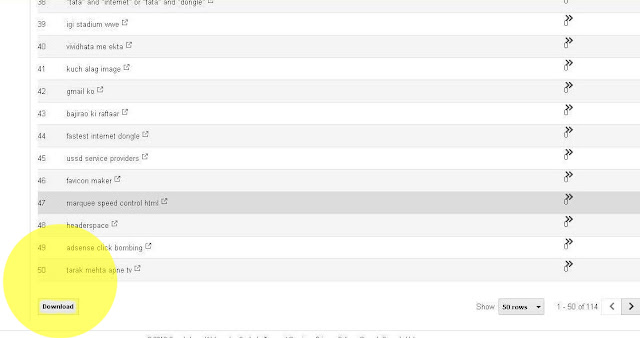
Ab aap ko jo keywords dikh  rahe he un sab ko download karna he to sabse pehle niche cursor le jaaye aur apne saare keywords download karle.


web traffic
web traffic


Ab aap jese hi file download ho jaave vese hi usme se jo keyword sabse jyada search and click huve he(top 10 keywords of your blog) woh dhundh ke note me likh le aur jese hi aap new article likhne jaaye vaha title me,image optimization,permalink,search description aur h1 and h2 heading me bhi issey use kare. aap chahe to aapke blog ke liye jitane keyword search huve he uss keywords me se bhi popular keyword choose kar sakte he. fir dekhe iska kamaal jo keyword already aapke blog me fit ho chuka he woh Google search me top pe rahega. aur 100% traffic boost hogi.


  ☻    2.Increase traffic by blogger social media secret tips


 Kya aap jaante he ki aap ke blog ke article ke niche jo social media buttons hote he ussey ignore karne ki aap jo bhul kar rahe he woh bilkul bhi thik nahi he jab tak aap social media pe share nahi karoge tab tak koi bhi nahi jaan paayega ki aapke article me he kya? aur jab tak visitors social media se nahi aayenge tab tak aapka article bhi search me nahi aa sakta. to sabse pehle aapke articles social media pe share karo.

 • Articles Strategy 

:- Ho sake to daily ek badhiya,clear,detailed aur helpful article post kare. and jab aapke 200 article ho jaaye tab 2 days me ek article post kare. next goal aapka ye he ki aapke 400 article ho jaaye tab aap 4 days me 1 article post kare aur ese hi 5-7 days me ek badhiya article apne audience ko de. aur jese hi aap article post kare vese hi niche diye gaye social media button se G+,Twitter,Facebook,Pinterest pe share jarur kare.
web traffic
web traffic


Permalink me kabhi bhi a,an,the,is and are jese stop word use na kare. jissey search engine ignore karta ho.
                                              Ab aapko ek aur social media ki secret baat bataane ja raha hu. oopar jo screen short me  social media icons  dikhaye jaa rahe he woh icons se aap daily sharing start rakhe agar aapke 50-70 articles he to daily subah 3 aur raat ko 3 articles step by step share jarur kare.(Note:- baar baar ek hi article share na kare daily alag alag article choose kare share karne ke liye jissey aapke reader isko spam na maane. isiliye maine aapko pehle hi bataya tha ki ye strategy sirf 30-50 ya ussey jyada articles jis blogger ke pass he uske liye he)
                                                        Ek keyword google search console me se aur ek keyword Google Adword se total 2 keyword  ko title tag,image optimization,search description,permalink,h1 h2 heading me and last me use jarur kare
                             Aur apna article ke andar jo words he uss words me agar aapke dusare article se related koi word he to usme apne dusare article ki link jarur daale ussey aapke articles ek dusare se connected ho jaayenge.
      In sab baato ko dimaag me  lekar blogging karoge to aapki web traffic 100%  badhegi. aur woh bhi 15-20 dino me likh lena meri Guaranty he. ☺☺☺☺☺☺☺☺☺☺☺

wifi net-wifi modem ke liye basic knowledge-wifi modem ke liye kuch jaruri baatey

Agar aapko ye Article achha laga he to niche diye gaye G+,twitter,facebook and pinterest se share jarur kare !!!! aur agar koi savaal he to niche comment darj kare
0

sitemaps-How to add sitemaps in blog ?-Add XML sitemap and HTML sitemap in your blog for seo-add XML site map in search console and HTML site map in blog

sitemaps
sitemaps
Sitemaps-Sitemap is a key of SEO. without sitemap you can't see more your blog in search engine. so,it's very important tool. increase your search traffic by sitemap. google easily find your articles. also add HTML site map in your blog....[....]
html marquee-aaj me aapko sikhaunga ki moving image url ke saath kese add kare?

How to add XML sitemap ?(for seo)
Sitemaps-XML sitemap improve your search result in google,bing etc and it is for SEO. Login to your account google search console. then click your blog url. if you do not added your blog yet then click add property and add your blog and verify it. after verification completed,go to crawl>sitemaps and then click add/test sitemap. Now Copy below link and past link into the box.
                                 atom.xml?redirect=false&start-index=1&max-results=500
this sitemap only for 500 article blog. if you have more than 500 articles then past below link.
                                 atom.xml?redirect=false&start-index=501&max-results=500
           if you have more articles then increase red highlighted number to 501,1001 etc........
  you are completed your step now follow below tips for add HTML sitemap. apply same tutorial in  bing(yahoo) webmaster tool done !!!

 
How to Add HTML sitemap ?(for visitors)
Sitemaps-HTML site map also help for improve your traffic rank and it is for visitors. Go to your blogger account and then go to pages. create new page and give the name "sitemap" in title bar.
and go to HTML and delete all words. then copy/past below code in html.  replace blogUrl: "http://www.mindedbro.com" to your Blog link.

<div dir="ltr" style="text-align: left;" trbidi="on">
<div id="tabbed-toc">
<span class="loading">Loading, please wait for a moment...</span></div>
<br />
<script type="text/javascript">
var tabbedTOC = {
    blogUrl: "http://www.mindedbro.com", // Enter your blog URL
    containerId: "tabbed-toc", // Container ID
    activeTab: 1, // The default active tab index (default: the first tab)
    showDates: false, // `true` to show the post date
    showSummaries: false, // `true` to show the posts summaries
    numChars: 200, // Number of summary chars
    showThumbnails: false, // `true` to show the posts thumbnails (Not recommended)
    thumbSize: 40, // Default thumbnail size
    noThumb: "", // A "no thumbnail" URL
    monthNames: [ // Array of month names
        "January",
        "February",
        "March",
        "April",
        "May",
        "June",
        "July",
        "August",
        "September",
        "October",
        "November",
        "December"
    ],
    newTabLink: true, // Open link in new window. `false` to open in same window
    maxResults: 99999, // Maximum post results
    preload: 0, // Load the feed after 0 seconds (option => time in milliseconds || "onload")
    sortAlphabetically: true, // `false` to sort posts by published date
    showNew: 7, // `false` to hide the "New!" mark in most recent posts or
 //define how many recent posts are to be marked by changing the number
    newText: " - <em style='color: white;padding: 1px 5px;border-radius: 20px;background-color: #F00;'>New!</em>" // HTML/CSS for
//the "New!" text
};
</script>
<script src="https://googledrive.com/host/0B_PLgWpOK_wTazVMekZ3TTBiY2M/" type="text/javascript"></script>
<style>
/*Sitemap  */
#tabbed-toc {
 width: 99%;
 margin: 0 auto;
 overflow: hidden !important;
 position: relative;
 color: #222;
 border: 0;
 border-top: 5px solid #FC0204;
 background-color: #1D1D1D;
 -webkit-transition: all 0.4s ease-in-out;
}
#tabbed-toc .loading {
 display:block;
 padding:5px 15px;
 font:normal bold 11px Arial,Sans-Serif;
 color:#FFF;
}
#tabbed-toc ul,
#tabbed-toc ol,
#tabbed-toc li {
 margin:0;
 padding:0;
 list-style:none;
 }
#tabbed-toc .toc-tabs {
 width: 24.8%;
 float: left !important;
}
#tabbed-toc .toc-tabs li a {
 display:block;
 font:normal bold 10px/28px Arial,Sans-Serif;
 height:28px;
 overflow:hidden;
 text-overflow:ellipsis;
 color:#ccc;
 text-transform:uppercase;
 text-decoration:none;
 padding:0 12px;
 cursor:pointer;
  -webkit-transition: all 0.3s ease-in-out;
}
#tabbed-toc .toc-tabs li a:hover {
 background-color: #515050;
 color: #FFF;
 }
#tabbed-toc .toc-tabs li a.active-tab {
 background-color: #FFFC03;
 color: #222;
 position: relative;
 z-index: 5;
 margin: 0 -2px 0 0;
}
#tabbed-toc .toc-content,
#tabbed-toc .divider-layer {
 width: 75%;
 float: right !important;
 background-color: #F5F5F5;
 border-left: 5px solid #FFFC03;
 -webkit-box-sizing: border-box;
 -moz-box-sizing: border-box;
 box-sizing: border-box;
 -webkit-transition: all 0.3s ease-in-out;
}
#tabbed-toc .divider-layer {
 float:none;
 display:block;
 position:absolute;
 top:0; right:0; bottom:0;
}
#tabbed-toc .panel {
 position:relative;
 z-index:5;
 font:normal normal 10px Arial,Sans-Serif;
}
#tabbed-toc .panel li a {
 display: block;
 position: relative;
 font-weight: bold;
 font-size: 11px;
 color: #222;
 line-height: 2.8em;
 height: 30px;
 padding: 0 10px;
 text-decoration: none;
 outline: none;
 overflow: hidden;
 -webkit-transition: all 0.3s ease-in-out;
}
#tabbed-toc .panel li time {
 display:block;
 font-style:italic;
 font-weight:400;
 font-size:10px;
 color:#666;
 float:right;
}
#tabbed-toc .panel li .summary {
 display:block;
 padding:10px 12px;
 font-style:italic;
 border-bottom:4px solid #275827;
 overflow:hidden;
}
#tabbed-toc .panel li .summary img.thumbnail {
 float:left;
 display:block;
 margin:0 8px 0 0;
 padding:4px;
 width:72px;
 height:72px;
 border:1px solid #dcdcdc;
 background-color:#fafafa;
}
#tabbed-toc .panel li:nth-child(even) {
 background-color: #DBDBDB;
 font-size: 10px;
}
#tabbed-toc .panel li a:hover,
#tabbed-toc .panel li a:focus,
#tabbed-toc .panel li a:hover time,
#tabbed-toc .panel li.bold a {
 background-color:#222;
 color:#FFF;
 outline:none;
 -webkit-transition: all 0.3s ease-in-out;
}
#tabbed-toc .panel li.bold a:hover,
#tabbed-toc .panel li.bold a:hover time {
 background-color:#222;
}
@media (max-width:700px) {
#tabbed-toc {
 background-color:#fff;
 border:0 solid #888;
}
#tabbed-toc .toc-tabs,
#tabbed-toc .toc-content {
 overflow:hidden;
 width:auto;
 float:none !important;
 display:block;
}
#tabbed-toc .toc-tabs li {
 display:inline;
 float:left !important;
}
#tabbed-toc .toc-tabs li a,
#tabbed-toc .toc-tabs li a.active-tab {
 background-color:#222;
 color:#ccc;
}
#tabbed-toc .toc-tabs li a.active-tab {
 color:#000;
}
#tabbed-toc .toc-content {
 border:none;
}
#tabbed-toc .divider-layer,
#tabbed-toc .panel li time {
 display:none;
}
}
</style></div>

Then change your setting. go to option and select 'Don't allow,hide exiting' in reader comment section and in compose mode select 'Show HTML literally' and in  line breaks select "Use <br> tag" then you are done all !!! all steps are completed.

if you have any question then post a comment and keep sharing !!!!
 keyword research tool-Easy and free way to get more traffic to your blog and website
1

Navigation bar-How to create perfect and SEO friendly pages navigation bar for blog or websites

Navigation Bar
Navigation-bar

Navigation bar-Today i want to tell you,how can create perfect navigation bar for blog or website.Any visitor to the navigation will be easier to reach your post.and also it is SEO friendly.Using the label, you can divide your post in different departments. click read more below and create your own navigation bar and use it.....[....]


How To create Navigation
Go to your blogger. select your blog and go to layout. click add gadget button below header. click page header +  button.  you added page successfully. now edit your blog post and click labels and choose your topic for ex. Entertainment,Blogging etc. we choose Entertainment.now go to your blog post and find your 'Entertainment' label below. then right click on 'entertainment' label and then copy link/url of Entertainment label. then go to layout>pages>edit>add external link and add your page title 'Entertainment' and past copied label link in web address (url) below. done!!!!!!!!!!!!!

 
How to use
Now when you will add entertainment post,you will must add label of entertainment. then when you will add Entertainment post,all posts will go to the 'Entertainment' department. and also you can see your post on home page. Enjoy and share this article for help your friend!!!! Navigation bar

if you have any question then post a comment for instant answer

create your own blog. blog kese banaaya jaaye?

2

keyword research tool-Easy and free way to get more traffic to your blog and website

keyword research tool

keyword research tool- Today I am going to share with you a great way of blogging. try Google adword keyword research tool for get highest traffic to your blog. How do  use the Google AdWord tool?. that I will give you the full details.Click on the title to complete read or click on Read More below to full access.try this and get high rank traffic absolutely free.....[....]


How to use ? 
First you go on the website of Google AdWords. Then login to adword.Now click keyword Planner in tools. then search for keyword and write 3,000 to 4,000 traffic keyword in the note book.use your keyword in title tag,meta description,permalink,labels,image optimization(alt tag and anchor text),keyword density,inter link and start and end of the article.Now look at your traffic will increase.

 
Do not do this
Always use 3,500 to 4,500 keyword. do not use more than 5000 traffic keyword and less than 3000 traffic keyword. it is better for you otherwise you can try any words.but it is recommended for new bloggers. always read Google terms and condition before use keywords on article. try different keyword for every article.

photos online-open karo website or image ko alag tab me

1

how to write article?-How to write a perfect article for your blog?-increase your page rank by perfect article

how to write article
how to write article-source by

how to write article-today i want to show you about articles writing and how you can get traffic easily on your blog?

► Writing  a good article is key of blogging. Good article can bring lots of traffic in your blog.

► Choose best title for your blog and add comfortable keyword first. always use Google adword for find better keyword. always choose 4,000 avg monthly keyword. it's a low traffic keyword....[....]


► how to write article-Do not add copyright content in your article and always use your own original words for share your thoughts.and write article for reader's help,not for money. What your readers want? It is very important for you to know.


► Always add your own image. do not use copyright image. add caption and title tag in your image.

► Type minimum 300 words in your article. and also add permalink,search description,location and labels. it's more important.

► I will post more about article. be patient for my next post. you can ask any question by comment in below.

► Share it!!! how to write article

the hair. baalo ko khubsurat kese banaaye?

1